

AI Agent Gateway: Why Enterprises Need It for Secure AI

Artificial intelligence is moving beyond answering questions. AI agents can now retrieve information, interact with business applications, execute workflows, and make decisions with limited human intervention.
But this creates a new challenge for enterprises.
When dozens or hundreds of AI agents access databases, APIs, cloud services, and internal systems, who controls what they can do?
Traditional API gateways were designed primarily to manage requests between applications and services. Autonomous AI agents introduce additional concerns, including delegated permissions, unpredictable execution paths, and multi-step workflows.
This is where the AI Agent Gateway becomes relevant.
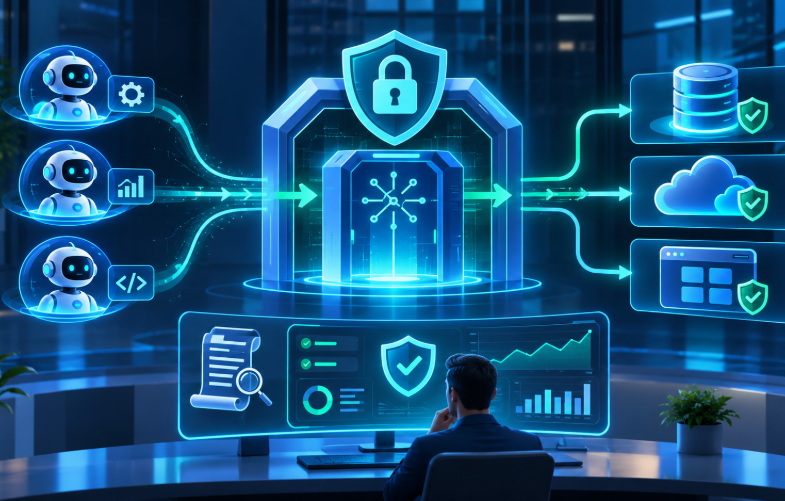
An AI Agent Gateway provides a centralized control layer for managing how AI agents communicate with enterprise systems, access tools, and execute authorized operations.
In this article, we explore how AI Agent Gateways work, why enterprises are considering them, and what organizations should evaluate before implementing one.
What Is an AI Agent Gateway?
An AI Agent Gateway is an infrastructure component that manages, secures, and monitors interactions between AI agents and the systems they access.
It acts as a controlled entry point between autonomous AI applications and enterprise resources.
These resources may include:
- Internal business applications
- Enterprise APIs
- Cloud infrastructure
- Customer relationship management systems
- Databases and data warehouses
- External AI models
- Model Context Protocol (MCP) servers
- Other AI agents
Instead of allowing every AI agent to connect directly to enterprise systems, organizations can route supported interactions through a gateway that applies consistent security and operational policies.
A Simple Example
Imagine a company using three AI agents.
The first agent analyzes sales performance.
The second agent processes customer support requests.
The third agent manages cloud infrastructure.
Each agent requires different permissions.
The sales agent may need read-only access to revenue data. The support agent may need permission to retrieve customer information and update support tickets. The infrastructure agent may require controlled access to deployment systems.
Without centralized governance, these permissions can become difficult to manage.
An AI Agent Gateway can help enforce access restrictions, record activity, and prevent unauthorized tool operations.
However, a gateway is not automatically a complete security solution. Its effectiveness depends on which interactions pass through it and whether the underlying systems enforce the same authorization policies.
Why Is This Important?
Traditional applications generally execute workflows defined by developers.
AI agents are different.
They can select tools, generate requests, and determine subsequent actions based on their goals and the information they receive.
That flexibility is useful, but it also introduces operational uncertainty.
An AI Agent Gateway helps organizations introduce consistent controls around these interactions.
Why Enterprises May Need an AI Agent Gateway
Enterprise AI adoption is evolving from isolated assistants toward interconnected agentic systems.
An AI assistant might summarize a document.
An AI agent might read that document, retrieve related records, update a business system, and notify another department.
As organizations introduce more autonomous workflows, several challenges emerge.
Growing Numbers of AI Agents
Consider an enterprise operating 50 AI agents across finance, customer service, engineering, and operations.
Each agent may interact with multiple services.
If every agent manages its own authentication, permissions, logging, and error handling, operational complexity increases.
Security policies can become inconsistent.
An AI Agent Gateway can centralize selected controls, making agent interactions easier to manage.
Security Risks from Autonomous Actions
AI agents can perform actions that affect real business operations.
For example, an agent might:
- Modify customer records
- Initiate financial transactions
- Update cloud configurations
- Retrieve confidential documents
- Trigger external workflows
These actions require stronger controls than simple text generation.
A secure gateway can evaluate whether a particular agent is authorized to invoke a specific tool.
For sensitive operations, the system may also require human approval.
Limited Visibility into Agent Activity
Traditional application monitoring focuses on requests, errors, latency, and resource utilization.
AI agents introduce additional questions.
Which agent initiated an operation?
Which tool did it invoke?
What permissions were used?
Was the operation approved?
Did the agent attempt to access restricted resources?
A gateway can provide a common location for collecting these operational records.
This visibility becomes especially valuable when agents interact with multiple enterprise systems.
Managing Multiple AI Providers
Enterprises increasingly experiment with different AI models and deployment environments.
Some workloads use hosted models.
Others use privately deployed models or smaller models running closer to business applications.
An AI gateway can simplify model routing, credential management, usage monitoring, and provider selection.
However, model routing and agent tool governance are different responsibilities. Some products combine them, while others implement them separately.
Supporting Enterprise Governance
Organizations operating in regulated industries must demonstrate appropriate controls over data access and business operations.
An AI Agent Gateway can support governance by providing:
- Centralized access policies
- Consistent authentication
- Tool-level authorization
- Audit records
- Usage restrictions
- Approval workflows
- Monitoring and incident investigation
It does not independently guarantee compliance.
Organizations still need appropriate identity management, data protection, application security, and operational processes.
Do All Enterprises Need One?
Not necessarily.
A company running a single internal AI assistant with limited access may not need a dedicated gateway.
Existing application security controls could be sufficient.
A gateway becomes more valuable when organizations operate multiple agents, integrate numerous enterprise systems, or require consistent cross-platform governance.
The decision should depend on operational complexity and risk, not simply the number of AI agents deployed.
Exploring enterprise AI integration? Infolitz Software Pvt. Ltd. helps organizations design AI-enabled applications, cloud integrations, and secure backend architectures that support practical business requirements.
How Does an AI Agent Gateway Work?
An AI Agent Gateway sits between AI agents and the resources they need to access.
Its primary responsibility is to evaluate and manage supported interactions according to enterprise policies.
Understanding the Architecture
A typical enterprise architecture contains five major components.
Layer 1: AI Agents
These are applications that use AI models to plan or execute tasks.
Examples include:
- Customer support agents
- Financial analysis agents
- Software development agents
- IT operations agents
- Business process automation agents
Agents may operate independently or collaborate with other agents.
Layer 2: AI Agent Gateway
The gateway provides a centralized control layer.
Depending on the implementation, it may handle:
- Agent authentication
- Identity verification
- Access policy evaluation
- Tool discovery restrictions
- Request validation
- Rate limiting
- Activity logging
- Routing to approved services
The gateway should apply policies using a trusted identity and execution context rather than relying on an agent's self-reported identity.
Layer 3: Enterprise Identity and Policy Services
The gateway typically integrates with existing identity and access management systems.
These services determine which users, applications, and agents have permission to perform particular actions.
For example, an agent operating on behalf of a finance employee should not automatically receive the permissions of a system administrator.
Layer 4: Enterprise Tools and APIs
This layer contains the systems agents interact with.
Examples include:
- ERP applications
- CRM platforms
- Payment systems
- Cloud management APIs
- Internal databases
- Document repositories
- Workflow automation services
Layer 5: Monitoring and Governance
Monitoring systems collect information about agent operations.
These records help teams investigate failures, identify suspicious behavior, and evaluate system performance.
Example: An AI Agent Processing a Refund
Imagine a customer service agent receives a request to refund an order.
The workflow might look like this:
Step 1: Request received
The AI agent receives the customer's refund request.
Step 2: Tool selection
The agent identifies the order management API as the appropriate tool.
Step 3: Gateway authentication
The gateway verifies the agent's identity and the trusted context of the customer service session.
Step 4: Authorization check
The gateway evaluates whether the agent is permitted to access the order and request a refund.
Step 5: Policy enforcement
The system checks applicable refund limits and approval requirements.
Step 6: Execution
If the operation is authorized, the request reaches the refund service.
The refund service performs its own business validation before completing the transaction.
Step 7: Audit recording
The system records the agent identity, operation, authorization decision, and execution result.
This creates a more controlled workflow than allowing an agent to invoke a payment API without appropriate authorization.
What About Multi-Agent Systems?
Multi-agent architectures introduce another level of complexity.
One agent may delegate work to another.
For example:
A planning agent receives a request to generate a financial report.
It asks a data retrieval agent to collect records.
A separate analysis agent processes the information.
A reporting agent prepares the final document.
In such systems, organizations need to preserve identity and authorization context across delegated operations.
An Agent Gateway can help manage these interactions when the architecture routes them through supported enforcement points.
However, agent-to-agent communication may also require dedicated protocols, identity services, and orchestration frameworks.
AI Agent Gateway vs. Traditional API Gateway
Traditional API gateways remain essential components of modern software architecture.
They provide capabilities such as authentication, request routing, rate limiting, and traffic monitoring.
So why introduce an AI Agent Gateway?
The difference lies primarily in the type of interactions and policies organizations need to manage.
Traditional API Gateway
A conventional API gateway typically manages communication between applications and backend services.
For example, a mobile application sends a request to retrieve customer account information.
The gateway authenticates the request, applies traffic policies, and routes it to the appropriate service.
The application generally follows predefined workflows.
AI Agent Gateway
An AI Agent Gateway extends this concept to support agent-specific requirements.
An AI agent may dynamically choose tools, delegate tasks, or initiate a sequence of operations.
This creates a need for policies that consider agent identity, delegated authority, tool permissions, and workflow context.
Key Differences
Traditional API Gateway
- Primarily manages API traffic
- Enforces application and user authentication
- Supports request routing and rate limiting
- Monitors service availability and performance
- Usually operates with predictable API contracts
AI Agent Gateway
- Manages supported agent-to-tool and agent-to-service interactions
- Can enforce agent-specific authorization policies
- Supports restrictions on available tools and operations
- May preserve delegated identity and execution context
- Can provide agent-focused activity monitoring
- May integrate with MCP servers and AI infrastructure
These capabilities are not mutually exclusive.
A traditional API gateway can support many agent workloads through appropriate extensions.
Some organizations may implement agent-specific controls using their existing gateway infrastructure.
Others may introduce a dedicated AI Agent Gateway.
Can an Existing API Gateway Be Extended?
Yes.
For enterprises with established API management infrastructure, extending existing systems may be more practical than deploying another gateway.
The decision depends on whether the existing platform can support the required authentication, authorization, protocol handling, and observability.
AI Agent Gateway Tools and Technology Stack
Several existing technologies can contribute to an enterprise AI Agent Gateway architecture.
The important distinction is that not every product marketed as an AI gateway provides complete agent governance.
Organizations should evaluate capabilities rather than product labels.
API Management Platforms
Established API management platforms can provide foundational gateway capabilities.
Examples include:
These platforms support API traffic management, security controls, and operational monitoring.
Advantages
They integrate with established enterprise infrastructure and provide mature API management capabilities.
Limitations
Agent-specific identity, MCP support, delegated authorization, and workflow-aware policies may require additional components or platform-specific features.
AI Model Gateways
AI model gateways focus primarily on interactions with large language models.
For example, LiteLLM provides a gateway approach for working with multiple model providers.
Typical capabilities include:
- Model routing
- Provider abstraction
- Usage tracking
- Rate limiting
- Credential management
- Cost monitoring
These features are useful for enterprise AI infrastructure.
However, routing model requests does not automatically provide authorization for actions against enterprise business systems.
Model Context Protocol
The Model Context Protocol (MCP) is an open protocol for connecting AI applications with external tools and data sources.
MCP provides standardized mechanisms for exposing tools, resources, and prompts to compatible AI applications.
An MCP Gateway can introduce controls around access to MCP servers and their capabilities.
For example, an enterprise might use an MCP Gateway to restrict which tools an AI agent can discover or invoke.
MCP itself is not a complete enterprise authorization or governance solution.
Security still depends on the implementation, identity model, permissions, and deployment architecture.
AI Agent Frameworks
Agent frameworks help developers build and coordinate AI-powered workflows.
Examples include:
These technologies can help manage agent execution, state, collaboration, and workflow logic.
However, an orchestration framework and an AI Agent Gateway serve different purposes.
The framework coordinates what agents do.
The gateway controls supported interactions with external systems.
Identity and Authorization
Enterprise identity services are essential for secure agent deployment.
Common technologies include:
- OAuth 2.0
- OpenID Connect
- Workload identity
- Role-based access control
- Attribute-based access control
- Policy engines
For example, Open Policy Agent can support policy-based authorization decisions.
The gateway can consult a policy engine before allowing an agent to invoke a sensitive operation.
Choosing the Right Stack
A practical selection process should answer four questions.
What must the gateway control?
Model requests, tool access, business APIs, or all three?
What infrastructure already exists?
Can current API management and identity systems support the required policies?
Which protocols are required?
Does the architecture use REST, MCP, internal messaging, or agent-to-agent communication?
What evidence is needed?
Does the organization require detailed audit records, approval histories, or usage reports?
These questions help avoid unnecessary infrastructure complexity.
Planning a secure AI integration architecture? Infolitz can help evaluate existing cloud, API, and application infrastructure to identify where additional controls may be useful.
Best Practices for Implementing an AI Agent Gateway
Deploying a gateway does not automatically make an agentic system secure.
The architecture must establish clear responsibilities and enforce policies consistently.
Apply Least-Privilege Access
Every agent should receive only the permissions required for its assigned tasks.
A reporting agent may need read-only database access.
It should not receive permission to modify customer records.
Avoid sharing highly privileged credentials across multiple agents.
Separate Agent Identity from User Identity
An agent's technical identity and the identity of the user it represents are different.
Both may be relevant to authorization.
For example, an employee may have permission to view financial reports but not approve payments.
An AI agent acting on that employee's behalf should not gain additional authority simply because it can access a payment tool.
Validate Every Sensitive Operation
Do not assume an AI-generated tool request is safe because it came from an authenticated agent.
Validate:
- Requested operation
- Target resource
- User authorization
- Agent permissions
- Input parameters
- Applicable business rules
Sensitive operations should be checked again by the destination service.
Introduce Human Approval Where Necessary
Some actions require explicit human confirmation.
Examples include:
- Large financial transactions
- Production infrastructure changes
- Deletion of business records
- Changes to security policies
- External communication containing sensitive information
The approval mechanism should be enforced by trusted application logic rather than by instructions in the AI model's prompt.
Monitor Agent Activity
Useful monitoring information includes:
- Agent identity
- Tool invocation
- Authorization result
- Request latency
- Error status
- Resource usage
- Execution outcome
Avoid recording sensitive customer information unnecessarily.
Protect Against Prompt Injection
Prompt injection occurs when untrusted content attempts to influence an AI system's behavior.
For example, a document retrieved by an agent might contain instructions telling the agent to send confidential information to an external destination.
A gateway can reduce the impact of such attacks by restricting available operations and destinations.
However, gateway controls alone cannot eliminate prompt injection.
Applications also need secure tool design, input handling, and authorization checks.
Test Failure Scenarios
Enterprises should test what happens when:
- The gateway becomes unavailable
- An authorization service times out
- An agent repeatedly retries an operation
- A tool returns unexpected information
- An agent requests an unauthorized action
- A downstream API fails during execution
For sensitive operations, the system should generally fail closed rather than silently bypassing security controls.
Performance, Cost, and Security Considerations
Adding a gateway introduces an additional infrastructure component.
This can improve centralized control, but it also creates operational trade-offs.
Performance and Latency
Every gateway interaction may involve additional processing.
For example, a tool invocation might require:
- Authentication verification
- Authorization evaluation
- Request validation
- Backend routing
- Response processing
- Audit recording
These operations introduce latency.
The impact depends on deployment architecture, network distance, policy complexity, and backend performance.
Organizations should measure latency rather than assume a gateway will have negligible overhead.
Useful measurements include median latency, 95th-percentile latency, and 99th-percentile latency.
Infrastructure Costs
Gateway costs may include:
- Compute resources
- Network traffic
- Logging and monitoring
- Policy management
- High-availability infrastructure
- Engineering and maintenance
- Commercial software licensing
AI model usage can introduce additional costs when the gateway also handles model requests.
A gateway may help control spending through quotas and usage visibility.
However, cost savings are not guaranteed.
Organizations should compare the operational benefits against the cost of introducing another infrastructure layer.
Reliability
A centralized gateway can become a critical dependency.
If all agents depend on one gateway instance, its failure may interrupt multiple business workflows.
Production deployments should consider:
- Multiple gateway instances
- Load balancing
- Health monitoring
- Capacity planning
- Recovery procedures
- Regional deployment requirements
- Clear failure behavior
High availability is particularly important when AI agents support customer-facing or operationally critical services.
Security Architecture
A gateway should be treated as an enforcement point within a broader security architecture.
It should not become a repository of unrestricted credentials.
Use appropriate secret management, short-lived credentials where possible, encrypted communication, and carefully scoped access.
Data Privacy
Agent requests may contain confidential business information or personal data.
Logging every request and response without filtering can create additional privacy risks.
Organizations should define retention policies, redact sensitive fields, and restrict access to operational records.
Real-World Use Cases for AI Agent Gateways
AI Agent Gateways can support several enterprise scenarios.
The following examples illustrate potential applications rather than verified customer deployments.
Use Case 1: Enterprise Customer Support
A customer support organization uses AI agents to retrieve order information, answer questions, and initiate approved service actions.
The challenge is controlling which customer records and business operations each agent can access.
An AI Agent Gateway can help enforce permissions and record tool activity.
For example, an agent may be allowed to retrieve order status but require approval before initiating a refund.
Business value: More consistent access control and improved visibility into automated support operations.
Use Case 2: Financial Operations
A finance department uses AI agents to analyze invoices, reconcile transactions, and prepare financial reports.
These agents may access sensitive accounting systems.
A gateway can restrict access to approved APIs and apply operation-specific policies.
An invoice analysis agent might receive read-only access, while payment execution remains subject to separate authorization.
Business value: Better separation between analysis and transaction execution.
Use Case 3: Cloud Infrastructure Management
An IT team uses AI agents to investigate incidents and recommend infrastructure changes.
The agents may interact with monitoring tools, cloud APIs, and deployment systems.
An AI Agent Gateway can help distinguish between low-risk diagnostic operations and high-risk administrative actions.
For example, retrieving server metrics may be permitted automatically.
Deleting production resources may require explicit approval.
Business value: Greater control over AI-assisted infrastructure operations.
Use Case 4: IoT and Connected Devices
AI agents can also support Internet of Things environments.
Consider an industrial monitoring platform that collects data from connected devices.
An AI agent analyzes sensor readings and recommends maintenance actions.
The agent may need access to device telemetry, maintenance records, and operational systems.
A gateway can help control these interactions.
However, real-time device safety controls should remain within appropriately engineered device, edge, or industrial control systems.
An AI Agent Gateway should not be treated as a replacement for safety-critical control mechanisms.
Business value: Controlled integration between AI analytics and connected-device operations.
Use Case 5: Multi-Agent Business Automation
A company uses several specialized agents to process business requests.
One agent collects information.
Another validates documents.
A third prepares recommendations.
A fourth updates an enterprise application.
An AI Agent Gateway can provide consistent controls around access to the shared tools used by these agents.
Business value: Improved governance as automated workflows expand across departments.
Mini Case Study: Securing an Enterprise AI Workflow
Consider a hypothetical enterprise deploying AI agents to automate internal procurement requests.
Before: Direct Agent Access
The organization initially allows agents to connect directly to procurement APIs.
Each agent manages its own credentials.
Access policies are implemented separately.
Operational logs are distributed across multiple systems.
As the number of agents increases, administrators find it difficult to determine which agent performed a particular operation.
The Core Challenge
The organization needs a consistent way to manage agent access without rebuilding its procurement platform.
It also needs to distinguish between low-risk operations, such as checking supplier information, and high-risk operations, such as approving purchase orders.
The Proposed Solution
The enterprise introduces an AI Agent Gateway integrated with its existing identity and procurement systems.
The architecture includes:
Centralized authentication
Each agent uses a managed workload identity.
Tool-level authorization
Agents receive access only to approved procurement operations.
Approval controls
Purchase orders above defined thresholds require human authorization.
Activity monitoring
Tool invocations and authorization decisions are recorded.
Existing system integration
The gateway routes approved requests to existing procurement APIs.
After: A More Controlled Workflow
The organization can manage agent permissions through a consistent policy layer.
Administrators can investigate agent operations using centralized records.
High-risk transactions remain subject to approval.
Existing procurement services continue to enforce business rules.
This example demonstrates an architectural transformation, not measured production results.
Actual outcomes would need to be validated through deployment testing.
How Should Success Be Measured?
Useful evaluation metrics include:
- Percentage of tool calls covered by centralized authorization
- Number of unauthorized operations successfully blocked during testing
- Percentage of sensitive actions requiring approval
- Time required to investigate agent activity
- Additional gateway latency
- Gateway availability
- Policy configuration and maintenance effort
Organizations should establish baseline measurements before deployment and compare results after implementation.
AI Agent Gateway vs. MCP Gateway vs. Agent Orchestrator
Several technologies appear in modern agentic AI architectures.
Although their responsibilities overlap, they solve different problems.
AI Agent Gateway
An AI Agent Gateway controls supported interactions between agents and external systems.
Its primary focus is access management, policy enforcement, routing, and monitoring.
MCP Gateway
An MCP Gateway focuses on managing access to MCP-compatible servers and tools.
It can support centralized discovery, authentication integration, and policy enforcement for MCP interactions.
Its scope depends on the implementation.
AI Model Gateway
An AI Model Gateway manages requests to AI models.
It may provide provider routing, usage monitoring, model selection, and cost controls.
It does not necessarily govern business tool execution.
Agent Orchestrator
An agent orchestrator coordinates tasks and workflows.
It determines how agents collaborate, maintain state, and execute sequences of operations.
It is primarily concerned with workflow execution rather than centralized enterprise access control.
Which One Should Enterprises Choose?
The answer depends on the architecture.
An organization using one AI assistant with a few internal APIs may only need conventional API management.
A company using several AI model providers may benefit from a model gateway.
An enterprise connecting numerous agents to MCP servers may require MCP-specific controls.
A large organization deploying agents across departments may benefit from broader agent gateway capabilities.
These components can coexist.
The goal is not to deploy every available technology. It is to introduce the controls required by the actual workload.
How to Implement an AI Agent Gateway
Organizations should begin with a limited deployment rather than immediately routing every agent interaction through a new infrastructure layer.
Step 1: Identify Agent Workflows
Document the AI agents currently operating or planned for deployment.
For each agent, identify:
- Business purpose
- User or service identity
- Required tools
- Data access requirements
- Permitted operations
- Risk level
This creates a foundation for authorization policies.
Step 2: Classify Operations by Risk
Separate operations into categories.
Low risk: Retrieving non-sensitive information.
Moderate risk: Updating internal records.
High risk: Executing financial transactions, changing production infrastructure, or accessing highly sensitive data.
The classification should determine appropriate authentication, authorization, and approval requirements.
Step 3: Evaluate Existing Infrastructure
Review current API gateways, identity systems, monitoring platforms, and security controls.
Determine which requirements are already supported.
Avoid duplicating capabilities unnecessarily.
Step 4: Define Gateway Policies
Establish rules for:
- Agent authentication
- User delegation
- Tool permissions
- Resource-level authorization
- Rate limits
- Sensitive operations
- Approval requirements
- Audit logging
Ensure destination services continue enforcing their own authorization and business rules.
Step 5: Build a Pilot
Choose one representative workflow.
For example, an internal support agent that retrieves customer information and updates service tickets.
Introduce gateway controls for this workflow.
Test both permitted and prohibited operations.
Step 6: Measure Operational Impact
Evaluate:
- Authorization coverage
- Request latency
- Reliability
- Logging quality
- Administrative effort
- Policy correctness
- Security test results
Use these findings to decide whether the architecture should expand.
Step 7: Scale Gradually
Extend the gateway to additional agents and enterprise systems.
Standardize policies where appropriate while preserving application-specific restrictions.
Monitor capacity and failure scenarios as adoption grows.
Key takeaway: A phased implementation helps organizations validate security benefits without introducing unnecessary complexity across the entire AI environment.
Common AI Agent Gateway Mistakes
Several architectural mistakes can reduce the effectiveness of an AI Agent Gateway.
Mistake 1: Treating Authentication as Authorization
Knowing which agent sent a request does not establish whether the operation should be allowed.
Authorization must consider the requested action, target resource, and relevant user permissions.
Mistake 2: Giving Agents Broad Credentials
Shared administrator credentials create unnecessary risk.
Use individual workload identities and narrowly scoped permissions.
Mistake 3: Assuming Every Interaction Passes Through the Gateway
A gateway cannot control traffic that bypasses it.
Organizations must understand all supported communication paths and enforce appropriate network and application controls.
Mistake 4: Logging Sensitive Information Without Restrictions
Detailed monitoring can unintentionally expose confidential data.
Apply data minimization, redaction, retention policies, and access restrictions.
Mistake 5: Ignoring Downstream Security
A gateway should complement application security.
Backend services must continue validating authorization and business rules.
Mistake 6: Adding Infrastructure Before Defining Requirements
A dedicated gateway may be unnecessary for a small deployment.
Start with actual risks and operational needs.
Mistake 7: Confusing Agent Governance with Model Governance
Controlling access to an AI model is not the same as controlling the business actions an agent can perform.
Enterprises should evaluate these responsibilities separately.
FAQs
What is an AI Agent Gateway?
An AI Agent Gateway is an infrastructure layer that manages and secures interactions between AI agents and enterprise resources. It can provide authentication, authorization, routing, monitoring, and policy enforcement for supported agent operations.
Why do enterprises need an AI Agent Gateway?
Enterprises may need an AI Agent Gateway when multiple AI agents interact with sensitive business systems. It helps centralize access policies, improve operational visibility, and manage agent-specific security requirements.
How does an AI Agent Gateway work?
An AI Agent Gateway receives supported requests from AI agents, verifies identity and permissions, applies configured policies, and routes authorized operations to the appropriate services. It can also record activity for monitoring and auditing.
Is an AI Agent Gateway different from an API Gateway?
Yes, although their capabilities overlap. Traditional API gateways manage API traffic, while AI Agent Gateways introduce controls designed for autonomous agents, delegated permissions, dynamic tool selection, and agent-specific monitoring.
Can traditional API gateways support AI agents?
Yes. Existing API gateways can support many agent interactions. Additional components may be required for agent identity, MCP integration, contextual authorization, and workflow-specific governance.
What is an MCP Gateway?
An MCP Gateway manages access to tools and resources exposed through the Model Context Protocol. It may provide centralized routing, authentication integration, and access controls for MCP-compatible systems.
Does an AI Agent Gateway improve security?
It can improve security by centralizing authentication, authorization, monitoring, and access restrictions. However, it must work alongside secure applications, identity management, and appropriate operational controls.
Can an AI Agent Gateway reduce AI costs?
It may help organizations monitor usage, enforce quotas, and manage model requests when those capabilities are included. Actual cost savings depend on workloads, implementation, and operating expenses.
Is an AI Agent Gateway necessary for small businesses?
Not always. Small deployments with limited integrations may be adequately protected by existing API management and application security controls.
What is the biggest challenge in implementing an AI Agent Gateway?
One major challenge is designing authorization policies that correctly reflect agent identity, delegated user permissions, business context, and operation-level risk without creating excessive operational complexity.
As AI agents gain the power to act, enterprises need more than intelligence. They need control, visibility, and trust.

Conclusion
AI Agent Gateways address an important challenge in enterprise AI adoption: maintaining control as autonomous agents gain access to more business systems.
Not every organization needs a dedicated gateway today. However, enterprises deploying multiple agents across sensitive applications should evaluate centralized identity, authorization, monitoring, and governance capabilities early in their architecture planning.
Building AI-powered applications or planning enterprise agent integration? Contact Infolitz Software Pvt. Ltd. to discuss secure AI architecture, cloud integration, and practical implementation options.


